Hearth and Hamlet Demo Polish Notes
Demo v1.0.46 Next Fest themes—gold, Advisor research, saves, localization, and comfort polish.
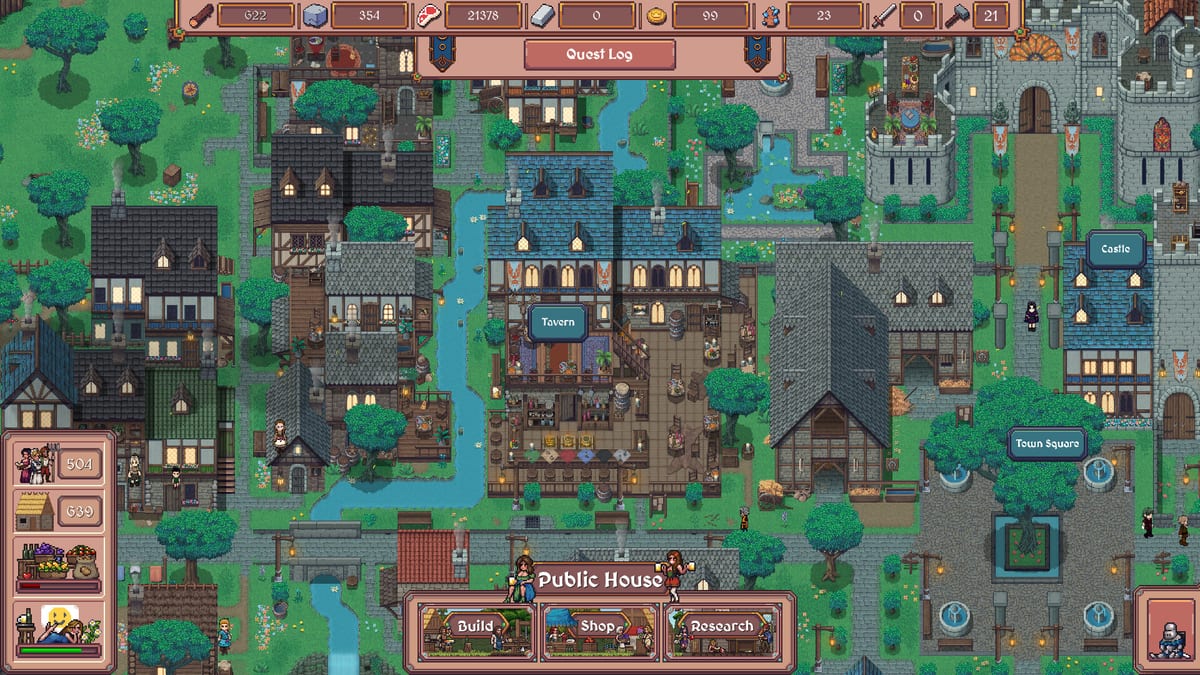
Hearth and Hamlet’s Steam demo has received public polish updates while the full game remains upcoming for August 19, 2026. This page summarizes known demo polish—especially the official Demo v1.0.46 Next Fest build—covering gold unlock, Advisor research, save compatibility, localization, UI scaling, audio, Shift+F11, readability, pacing, and stability. It does not invent a fake private changelog or claim the complete game is already live.
For hands-on settings, open Controls and Steam Deck Settings. For calendar facts, open Release Date. For what the slice teaches versus August, read Demo vs Full Game. Official posts live on the Steam community hub.
How to read this summary
- Themes below mix named v1.0.46 features with broader comfort categories from public demo communication.
- Exact build numbers can still change; prefer Steam news when you need a specific build.
- Gameplay numbers (worker counts, research rewards) have been adjusted—retest old habits.
- Backend robustness in v1.0.46 came with older save incompatibility. Treat demo kingdoms as practice labs.
Demo v1.0.46 headline features
Official Steam Next Fest notes for Demo v1.0.46 call out:
- slightly extended progression and content,
- several new buildings unlocked,
- gold resource access unlocked (see How to Get Gold),
- one additional main story quest,
- new research options, including Advisor research in the Leader’s Hut / Manor,
- worker quantity and research reward rebalances,
- combat rebalance,
- UI scaling (Automatic/manual), independent audio categories, Shift+F11 hide UI, 4K readability,
- launch options for crash troubleshooting,
- localization support additions such as Traditional Chinese and Korean,
- older save files no longer compatible after backend changes.
Around the same Next Fest window, developers also celebrated crossing roughly 70,000 wishlists—useful context for why the demo slice was expanded, not a gameplay unlock by itself.
UI scaling
Full UI scaling support is a headline comfort feature. Players can use Automatic scaling or set a manual value in Options. This answers readability complaints on 4K desktop and helps Steam Deck-class displays.
Practical impact:
- Resource meters become usable without lowering native resolution.
- Policy and research screens stop feeling microscopic.
- Deck sessions become realistic for longer than five minutes.
If you have not touched scaling yet, do that before judging the demo’s UX. Details live on Controls and Steam Deck Settings.
Audio controls
Polish messaging highlights more independent audio controls so long cozy sessions can mix music and effects sanely. Incremental games reward leaving the client open; audio comfort is retention, not fluff.
Try lowering repetitive effect loudness if hold-to-gather fatigues you, and keep music as a soft status soundtrack while you alt-tab through the Worker Planner.
Shift+F11 hide UI
Demo notes call out Shift+F11 to hide the UI. Use it for screenshots and scenery, then restore panels before raids or tax experiments. Hiding the UI is not a pause.
Zoom and large-resolution readability
Alongside UI scaling, polish work adjusted zoom / game size behavior for large resolutions such as 4K. Combine zoom comfort with scaling rather than only forcing a lower desktop resolution.
Stability and launch options
Public demo communication mentions additional launch options / command-line arguments for players experiencing crashes while the technical foundation hardens toward full release. Guidance:
- Verify integrity on Steam.
- Confirm System Requirements.
- Use developer-posted launch options from Steam news when needed.
- Avoid random unofficial flag lists copied from unrelated games.
Gold, Advisor research, and pacing
Demo v1.0.46 is the moment many players first see gold as a real resource. Pair that unlock with How to Get Gold and spend coin on multipliers rather than vanity. Advisor / QoL research in leadership buildings is a deliberate Next Fest addition—do not skip the Leader’s Hut / Manor layer while stacking wood forever.
Worker quantities and research rewards were rebalanced at the same time. Practical takeaway:
- Rebuild ratios with the Worker Planner after major demo updates.
- Re-check Research Priority if a formerly great node feels weak.
- Protect morale when gold sinks tempt aggressive taxes (Happiness).
- Do not assume a month-old YouTube split still matches current demo pacing.
Save compatibility warnings
v1.0.46 warned that backend systems broke older demo saves. If Steam news warns about incompatibility, start fresh rather than fighting a dead save. Your real progress is food/wood skill—not a brittle JSON file. Do not assume automatic transfer into the August 19, 2026 full game unless Steam later posts a clear migration note (Demo vs Full Game).
Localization note
Localization support expanded in this window (including Traditional Chinese and Korean among updates). Confirm your in-game language in Steam properties before judging UI density in DE/JA/KO or other packs.
What demo polish does not mean
- It does not mean the full game launched early.
- It does not freeze balance forever until August 19, 2026.
- It does not guarantee every storefront building is already in the demo.
- It does not replace reading the latest Steam announcement before reporting a “new” bug that was already fixed.
- It does not invent a launch Price—that stays TBA until Steam shows a number.
Suggested verification checklist after any demo update
- Boot once and confirm Options still show scaling/audio controls.
- Test Shift+F11 hide/show.
- Verify gold appears after progression (or after updating to v1.0.46+).
- Play twenty minutes with the early Worker Planner table.
- Note whether food/wood pacing feels different.
- Skim research costs—and Advisor nodes—for surprise rebalances.
- Check Steam news for save warnings.
- Update your personal notes before launch week.
Related reading
- Settings: Controls · Steam Deck Settings
- Economy: Resources · How to Get Gold · Policies
- Prep: Launch Checklist · Release Date · Price
- Expectations: Demo vs Full Game · Links Hub
Editorial promise
This page names Demo v1.0.46 because that build is publicly documented. It still stays theme-honest rather than inventing private patch theater. Play the polished demo, learn the comfort tools, practice gold and happiness, and keep describing the full release as planned for August 19, 2026 until Steam flips the switch.
Frequently Asked Questions
Quick answers to the most common questions.
What is Demo v1.0.46?
The official Next Fest demo build that unlocked gold, added Advisor research and extra content, rebalanced workers/research/combat, expanded localization, and broke older saves after backend changes.
Did the demo add UI scaling?
Yes. Public demo polish added full UI scaling with Automatic and manual options in the Options menu.
How do I hide the HUD?
Press Shift+F11 to hide the UI, then press it again to restore panels.
Why won’t my old demo save load?
Demo v1.0.46 and similar backend updates break older saves. Start a new practice kingdom when Steam warns about compatibility.
Where are exact patch version numbers?
Check Steam news/community announcements. This page anchors on Demo v1.0.46 and summarizes polish themes instead of inventing a fake private version list.
Is the full game out because the demo is polished?
No. Demo polish prepares for the planned August 19, 2026 full release; it is not the launch itself.